
The World & Navigation
Crystaria is big. Three worlds big — a sprawling overworld, an Underworld below it and a Sky above — and all of it walkable one tile at a time. Fortunately, getting around is half the fun, and this page is the other half.
The Map
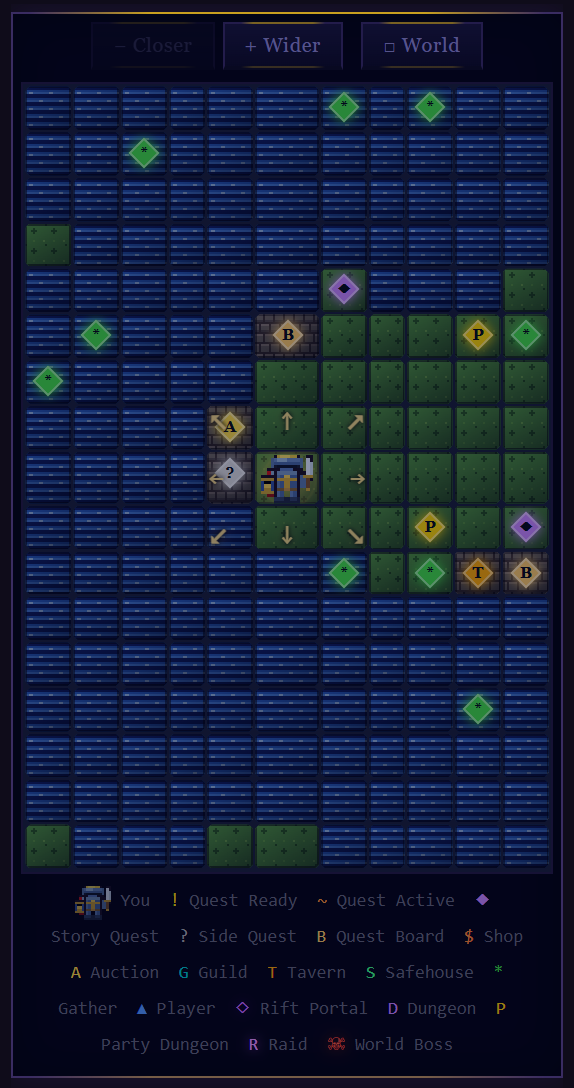
Crystaria is a large tile-based world. Your position is marked by your class sprite on the map, with gold arrows on the tiles you can step to. Other active players appear as ▲ markers. Click Game in the navigation bar to view your current tile and surroundings.
The map has three zoom levels, toggled with the Closer / Wider buttons:
- Close (11×17) — Detailed view showing terrain textures, POI badges, and your class sprite.
- Regional (25×25) — Colour-coded overview for medium-range planning.
- World — Full canvas map of the entire world.
The Pop-Out World Map
Beneath the in-game zoom buttons is a □ World button that opens a separate, full-screen pop-out map in a new window. Pan with mouse drag, zoom with the scroll wheel, and hover any tile to see its name, type, and any landmark there. The pop-out only shows the high-value destinations: Towns, Dungeons, Raids, Auction Houses, and Crystagyns. Quest markers and gathering points are deliberately omitted so the at-a-glance overview stays readable. Your character is marked with a white halo.
Moving
Move by tapping any of the eight tiles beside you (gold arrows mark them), with the eight-direction compass beside the map, or with the keyboard. Your grid location and coordinates sit directly above the map and update as you walk. Moving costs no resources but advances game time and triggers enemy spawns on your new tile. The ↻ button refreshes your current tile without moving.
Game Controls
On the desktop version, keyboard shortcuts let you move and act without clicking. Keys are automatically disabled whenever you are typing in a text field. Every key below is rebindable — see Custom Keybinds at the end of this section.
Movement (default keys):
| Key(s) | Action |
|---|---|
| W / ↑ | Move North |
| S / ↓ | Move South |
| A / ← | Move West |
| D / → | Move East |
| Q | Move North-West (diagonal) |
| E | Move North-East (diagonal) |
| Z | Move South-West (diagonal) |
| C | Move South-East (diagonal) |
Inside a dungeon, all eight directions work — diagonals included (W A S D / arrows).
Actions (default keys):
| Key | Action |
|---|---|
| F | Attack (only while in combat) |
| R | Cast (only while in combat) |
| G | Take Loot (grabs the first drop) |
| B | Open Bag |
| V | Open Character |
| T | Open Quests |
| M | Return to Map / Tile |
Combat keys (Attack, Cast, Take Loot) only do anything when the relevant button is on screen, so they stay out of your way outside of a fight.
Custom Keybinds
Open Game ▾ → Keybinds to remap any key. Click a direction on the compass grid or an action row, then press the key you want — it's saved instantly. A key can only be bound to one thing at a time, so reusing a key automatically frees it from its old binding.
- Binds are stored per device (in your browser), so each computer can have its own layout.
- The arrow keys always move you North / South / East / West as a permanent fallback — you can never lock yourself out of moving.
- Reset to defaults restores the WASD layout and default action keys in one click.
On mobile, the same eight-direction D-pad sits on the Play tab and your location shows in the header. Each tap moves one tile in the chosen direction. (Custom keybinds are a desktop feature.)
Tile Types
Map Markers
| Badge | Meaning |
|---|---|
| ! | Quest NPC with a completed quest ready to hand in |
| ? | Quest NPC with a quest available to accept |
| A | Auction House |
| G | Crystagyn (essence binding) |
| T | Tavern (guild management) |
| S | Safehouse (bank & inn) |
| $ | Shop |
| * | Gathering Point |
| D | Dungeon Entrance |
| M | Magic School (spells & the Fusion Codex) |
| E | Essence Lab (fuse & re-roll essences) |
| ⚒ | Smash Shop (salvage gear into Ascension Dust) |
| ▲ | Another player |
Areas & Locations
The world is divided into named Areas, each with a recommended level range. Your current area name and coordinates are displayed beneath the map. Stronger enemies spawn in higher-level areas — explore cautiously and check enemy difficulty colours before committing to a fight.
| Area | Terrain | Level Range |
|---|---|---|
| ◆ BEGINNER | ||
| Forgotten Plains | Land | 350 – 500 |
| Southern Valley | Land | 560 – 680 |
| KiRoni Plainslands | Land | 1 – 65 |
| Ronita Lake | River | 15 – 50 |
| Bloodshore Heath | Forest / Land | 400 – 560 |
| Southern Peak | Mountain | 500 – 620 |
| Frostbite Forest | Forest | 20 – 65 |
| KiRoni Training Area | Land | 25 – 90 |
| The Crystalsea | Ocean | 30 – 130 |
| Sanctuary | Forest | 50 – 150 |
| Sunscorched Dunes | Desert | 75 – 165 |
| ◆ INTERMEDIATE | ||
| The Ashfields | Land | 90 – 185 |
| Raygos Cauldron | Mountain | 100 – 190 |
| Embertide Channel | River | 110 – 200 |
| Dakuban Mines | Mountain | 110 – 215 |
| Frostbound Reach | Land | 130 – 265 |
| Dakuban Snowplains | Snow | 145 – 280 |
| ◆ ADVANCED | ||
| Snowfoot Plains | Land | 215 – 335 |
| Frostpine Wood | Forest | 235 – 355 |
| Ruins of Jukhaz | Mountain | 255 – 375 |
| Lake Terrvo | River | 275 – 395 |
| Everbloom Forest | Forest | 295 – 415 |
| Cruxis Frostlake | River | 320 – 450 |
| Snowfall Mountain | Mountain | 320 – 450 |
| Frostspire Sanctuary | Mountain | 335 – 465 |
| Mt. Syphor | Mountain | 375 – 510 |
| Grande Lake | River | 500 – 660 |
| Lake Vespír | River | 390 – 525 |
| Vespír Highlands | Land | 400 – 580 |
| ◆ HIGH-LEVEL | ||
| Dea Siroz Wasteland | Wasteland | 430 – 615 |
| Valkmur Wellspring | Land / River | 465 – 640 |
| Border Mountains | Mountain | 490 – 650 |
| Valkmur Scorchsands | Desert | 520 – 675 |
| Ixie Lowlands | Land | 550 – 705 |
| Ashbeck Meadow | Forest | 570 – 730 |
| Grandius Watershore | River | 575 – 745 |
| Jia Migos Crossing | Land | 580 – 750 |
| Grandius Steppes | Land | 600 – 770 |
| ◆ END-GAME | ||
| Ji Rok Swamp | Marshland | 645 – 815 |
| Nemyian Mountain | Mountain | 710 – 875 |
| Nemyia Forest | Forest | 740 – 905 |
| Crimson Wastes | Wasteland | 760 – 930 |
| Crystalmoor Highlands | Forest | 880 – 1500 |
| Valley of Heroes | Land | 925 – 1500 |
| Heaven's Ridge | Ocean | 960 – 2000 |
| Hell's Fall | Ocean | 960 – 2000 |
The Newer Realms
The world has grown far past the old table — the map itself now runs 135 tiles wide. The frontier, in the order you'll meet it:
| Zone | Levels | Reached by |
|---|---|---|
| Echo Wastes | 850 – 1,050 | mainland north-east |
| Ashfall Caldera | 970 – 1,150 | mainland south-east |
| Blighted Expanse | 1,160 – 1,400 | mainland east |
| Starfall Tundra (island) | 2,000 – 2,350 | The Frozen Crossing causeway, NE shore |
| Vitrified Wastes (island) | 2,300 – 2,650 | The Glass Steps from the Worldspine |
| The Worldspine (island) | 2,600 – 2,982 | The Shattered Causeway (Lv 2,600) from the Forgotten Plains |
The Notification Log
One line in the middle of the navigation bar shows the last thing that happened to you — a gather, the EXP of your last kill, the last drop, a buff or debuff running out. Click it for the last ten. It only repeats what the game already told you elsewhere, so it is never the only place a thing is recorded, and it starts fresh each session.