
Equipment
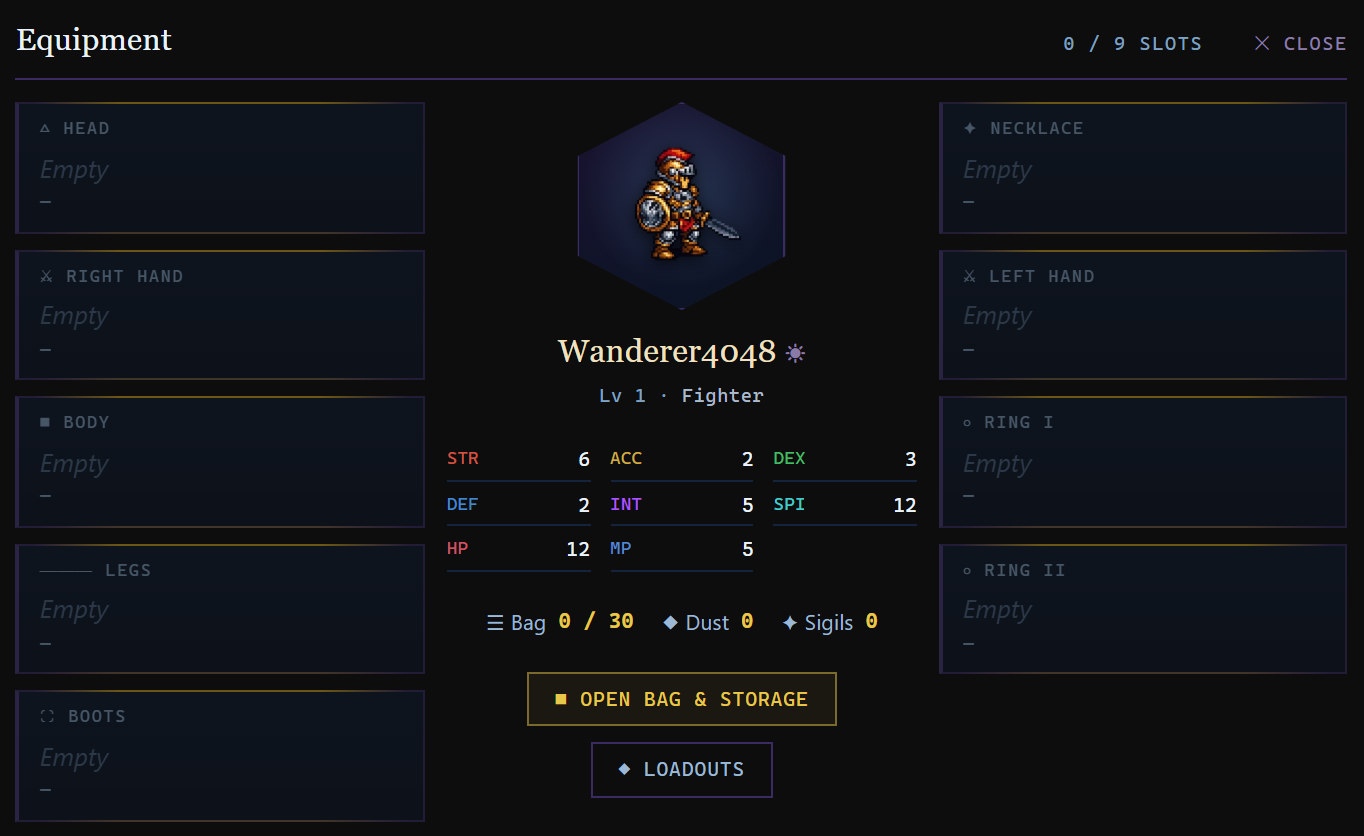
You are, at any given moment, nine pieces of gear away from being someone else entirely. This page covers the slots, where the good stuff comes from — and the golden rule: gear in Crystaria never wears out, so a great find is yours for life.
Item Slots
| Slot | Type | Source |
|---|---|---|
| Weapon | Sword, Dagger, Axe, Staff, and more | Shop, drops, crafting (Blacksmith; Woodworker for bows, staves, wands and harps) |
| Helmet | Head armour | Shop, drops, crafting (Armorsmith for Heavy, Leatherworker for Light, Tailor for Cloth) |
| Armour | Body armour | Shop, drops, crafting (Armorsmith for Heavy, Leatherworker for Light, Tailor for Cloth) |
| Shield | Off-hand defence | Shop, drops, crafting (Armorsmith for Heavy, Leatherworker for Light, Tailor for Cloth) |
| Legs | Leg armour | Shop, drops, crafting (Armorsmith for Heavy, Leatherworker for Light, Tailor for Cloth) |
| Boots | Foot armour | Shop, drops, crafting (Armorsmith for Heavy, Leatherworker for Light, Tailor for Cloth) |
| Ring ×2 | Jewellery | Drops, Jeweller |
| Necklace | Jewellery | Drops, Jeweller |
Item Rarity
Every weapon and armour piece belongs to a rarity tier, shown by the colour of its name everywhere it appears — shop stock, your bag, the equipment panel, the Auction House, and the loot list after a battle. Rarer items carry better value and stats for their level.
| Tier | Colour | What it means |
|---|---|---|
| Common | Ivory | The everyday baseline — most gear. |
| Uncommon | Green | A cut above for its level bracket. |
| Rare | Blue | Top-value finds — worth a second look. |
| Epic | Purple | The best of each level bracket. A purple flash in the loot list is a good day. |
| Legendary | Amber | A loot-quality drop of a base item, named Legendary [Item] — boosted stats and 5 essence slots. Falls from dungeon bosses. |
| Unique | Crimson | Trophies of slain Rare Monsters — and the set pieces of raid final bosses. |
| Dark Crystal | Magenta | The endgame tier, forged in the Underworld. Cannot be bought. |
Weapon Types & Hands
Weapons come in two sizes: One-handed (held in the right hand) and Two-handed (occupies both hands). Two-handed weapons cannot be used with a Shield. Equipping a two-handed weapon automatically unequips whatever was in either hand.
Armour Classes
Every piece of worn armour — chest, helmet, shield, legs and boots — belongs to one of three weight classes, and you can only equip your own. This is a hard gate, not a penalty: a Magician cannot put on plate at all. The class is shown on the item card, and trying to equip the wrong one tells you who it is for.
| Class | Favours | Worn by | Forged at |
|---|---|---|---|
| Heavy plate and mail | Strength / Accuracy | Fighter, Gladiator, Lancer, Paladin, Death Knight, Hexblade | Armorsmith |
| Light leather and hide | Dexterity / Accuracy | Rogue, Archer, Pugilist, Runesmith, Skypirate, Bushin | Leatherworker |
| Cloth robe and silk | Intelligence / Spirit | Magician, Warlock, Necromancer, Minstrel, Tamer, Mimic, Astromancer, Elementalist | Tailor |
Each weight also decides which attributes a piece leans on, so the armour you can wear already matches the stats your class wants — you are never choosing between fitting and effective.
Managing Equipment
Open the ■ Bag entry on the Character ▾ dropdown in the top nav. Select an item to see its stats and options to equip, unequip, sell, or destroy it. You can only equip items at or below your current level.
Weapons are class-restricted by proficiency rank — each class can only equip weapon types it has a rank in. Attempting to equip an incompatible weapon type is blocked. See the Weapon Skills section for the full proficiency table.
Hover-Compare Tooltips
The item detail panel shows a vs. your equipped delta column beneath the stat block: green numbers for upgrades, red for downgrades. It works for any weapon, armour piece, ring, or necklace and removes the mental arithmetic from gear shopping.
Loadouts
Each class can save up to 3 gear configurations via the ◆ Loadouts button in the inventory header. Save your current loadout, name it, then snap back to it in one click later. Items you no longer own at load-time are skipped (not destroyed) with a count in the result alert. Items above your current level are also skipped — ties into the equip-level rule. Useful for swapping between PvE and PvP gear, or between dungeon and crafting setups.
The Class Locker
Every class keeps its own gear. Open Equipment → Class Locker and claim any piece you are wearing for the class you are playing. From then on it is that class's: it stows itself when you switch away — taking no bag slot while stowed — and comes back on when you return, standing in for your own gear in that slot. A slot a class leaves empty wears your own, so a Runesmith with only a hammer claimed wears your armour, rings and amulet as before. When a class's piece takes a slot your own gear was in, that piece of yours stands aside (no bag slot either) and returns the moment the slot frees. A stowed piece cannot be sold, mailed or destroyed; the Vault lists it with its class and banks it, which releases it, and release hands it back to the bag when there is room. A two-hander from a locker takes both hands, exactly as it does from the bag.
Quest Items Don't Count Toward Bag Size
Equipment items count toward your bag size cap, but quest items, dungeon keys (Ember Cores, Tidal Pearls, etc.), travel items (Boat, Skis), and treasure maps do not. These are stored separately in the "Access / quest items" section of the inventory panel and never compete with your equipment slots. You can carry them freely without bag-management overhead.
Class-Change Auto-Strip
When you switch character class (via the Class menu) the game automatically unequips any weapon the new class cannot wield and, if the new class lacks Dual Wield, drops the off-hand weapon too. Items are not destroyed — they return to your bag in the unequipped state, ready to be picked back up by the class that can use them. A summary alert lists which items were removed.
Item Quality
- Normal — Standard items from shops and drops.
- Crafted — Player-made items with 5 Crystagyn essence slots. A fine finish mints ✦ HQ (+20% stats, +25% above item level 5,000, double value); an exceptional one mints ✧ Peerless (+35% stats, 3.5× value). See Crafting.
- Legendary — Rare drops from Dungeon Bosses with boosted stats and 5 essence slots. Named Legendary [Item Name].
Gear Caps
Two caps decide how much of a piece’s stats actually reach you. Per item, a piece can add at most 1× its own level to any stat (the 0.5× level curve with 2× headroom), 0.6× its level as weapon damage and 0.4× as Defence — the item card marks a piece that is clipped this way. In total, everything you have equipped can add at most 100% of your base stat (your level and allocation) to each stat; gear above that line is not counted, and Gear Ascension is applied on top of the counted amount — your most Ascended pieces are counted first, so adding, upgrading or Ascending a piece never lowers a stat. The Stat Breakdown’s Equipment row names the total cap wherever it is the limit, with what your gear offered against what was counted.
In practice: once a stat sits on the total cap, more of that stat from gear changes nothing until your base stat grows — Ascension still raises it, and a stronger piece still helps on every stat that is under its own cap. The item card’s “vs your equipped” line shows what a swap would really count for.
Set Bonuses
Armour comes in named sets — the pieces a dungeon or raid boss drops, and, since Patch 4.8, every craftable armour tier (the four slots of one level and rarity from one bench). Wear three pieces of one set for +10% to all six stats, four for +20%. Only one set is active at a time — the one with the most pieces equipped — and HQ or Peerless finishes on crafted pieces still count. The active set and its bonus show on the Equipment panel.
Artisan Accessories
A separate line of rings and necklaces that carry no combat stats at all. Instead they serve the professions. For gathering, each profession has its own pair at Apprentice, Journeyman and Master rank: a chance of an extra unit on every gather, better odds of the rarer finds, and gathering XP. At the crafting bench the two rings give a share more CP and Durability and stronger progress and quality per action, and the necklace sets your crafting style — see Crafting for every piece and what each one trades. Wear them to gather or craft, then swap back to your fighting rings with a Loadout.
Essence Slots
Items have a number of Crystagyn Slots. Each slot can hold one bound essence, permanently adding a stat bonus. Crafted and Legendary items always have 5 slots. See the Crystagyn section for details.
Gear Ascension
Any equippable item can be Ascended from +0 up to +10. Each ascension level boosts the item's six attribute bonuses (Strength, Accuracy, Dexterity, Defence, Intelligence, Spirit) by +5 % — a fully ascended item grants +50 % of its attributes. Open an item's card (hover a bag row for a preview, or click the item's name to pin the card) to find its Ascension panel.
- Salvage an unwanted item to break it down into Ascension Dust — done at a Smash Shop in town (map marker ⚒), one piece at a time from its detail card or in bulk from the shop's own panel. (Equip-locked and equipped items can't be salvaged — unequip or unlock first.)
- Ascending to +1 through +6 costs gold and Dust.
- Ascending to +7 through +10 additionally requires Ascendant Sigils, earned in the Shifting Labyrinth (floor first-clears, Vault chests and season rewards).
- Higher tiers have a chance to fail. On a failure the gold and Dust are consumed but the item is never destroyed — and Sigils are only spent on a success.
The Wardrobe
The Wardrobe lets you customise your battle sprite — the figure that fights for you in every encounter. Crystaria doesn't show your gear on your character, so this is where you make your mark.
Skins & Auras
Two slots: one Skin (a recolour of your class sprite) and one Aura (a glow that wreathes it). Wear one of each at once and mix to taste.
| Type | Options |
|---|---|
| Skins | Frostbound, Molten, Verdant, Shadowclad, Spectral, Gilded, Crimson, Tidal |
| Auras | Ember, Void, Radiant |
Where to find it
Visit the Curio of Vanities (the flair merchant, the same one who sells nameplates) and open your Wardrobe. Browse every skin and aura, then unlock the ones you love with gold — the preview sprite shows the look you currently have equipped.
Earned flair
Not everything is for sale. A Prismatic skin and a Champion's Aura unlock automatically once you've banked enough achievement points — the first of an earned tier that future systems will keep filling.
Loadouts
Save your current set of worn gear as a Loadout and switch back to it in one click. You have 10 named slots per class; loading one unequips what you are wearing in those slots and re-equips the saved pieces, skipping (and telling you about) anything you no longer own. A loadout can be copied to another of your classes. Standing on your own Safehouse tile, a loadout may pull gear straight out of the Vault and store the displaced gear back, one for one, so your bag never overflows; anywhere else, vaulted pieces are reported as “in your vault” and left where they are.
The Treasure Cabinet
Now and then a dig turns up more than gold. Every treasure you unearth has a 12% chance of also holding a curio — one of four that only a map of that tier can hold, and never one you already have. A tier that has kept you waiting 12 digs gives one up. Curios are not items: they cannot be traded, sold or lost. Your Cabinet opens from the X marks the spot card.
| Found with | Curios |
|---|---|
| Tier 1 maps | Tarnished Locket, Clay Votive, Rusted Spur, Drover Whistle |
| Tier 2 maps | Silver Thimble, Ivory Die, Brass Astrolabe Ring, Guildmaster Seal |
| Tier 3 maps | Jade Frog, Enamel Swallow, Moonstone Brooch, Navigator Sextant |
| Tier 4 maps | Obsidian Mirror, Golden Scarab, Dragonbone Flute, Reliquary Key |
| Tier 5 maps | Star-Iron Compass, Crown Fragment, Phoenix Feather Quill, Heart of the Hoard |
Completed shelves earn titles: 1 shelf — Curio Collector, 3 shelves — Relic Keeper, 5 shelves — Master of the Hoard. Completing all five earns the Verdigris skin, which no shop sells.